 Handbook
Deploying new PKI code
General Information
A few notes on our deploy process.
Cadence
- Most weeks, we plan to do a full deploy on Tuesday and Thursday.
- We are able to deploy at any time, but off-cycle deploys should be communicated with on-callers if possible
- We default to not deploying if we expect most of the team will be out on the day(s) following. Some examples are:
- Fridays
- Before a holiday
- Before a large part of the team is expected to be on leave
Communications
Err on the side of overcommunication about planned/unplanned deploys–-make sure to post in the steps in Slack as they are happening and coordinate with @login-appdev-oncall and @login-deployer. Most people expect changes deployed on a schedule so early releases can be surprising.
Deploy Guide
This is a guide for the Team Katherine engineer who shepherds code to production for a given release.
When deploying a new release, the engineer should make sure to deploy new code for the following:
Pre-deploy
Cut a release branch
cd identity-pki
git fetch
git checkout $(curl --silent https://checking-deploy.pivcac.staging.login.gov/api/deploy.json | jq -r .git_sha)
git checkout -b stages/rc-2024-01-09 # CHANGE THIS DATE
git push -u origin HEAD
A pull request should be created from that latest branch to production: stages/prod. When creating the pull request:
Pull request release
- Title the pull request clearly with the RC number, ex “Deploy RC 112 to Prod”
- If it’s a full release of changes from the
mainbranch, add one to the last release number - If it’s a patch release, increment the fractional part, ex “Deploy RC 112.1 to Prod”
- Unsure what the last
identity-pkirelease was? Check the releases page
- If it’s a full release of changes from the
-
Add the label
status - promotionto the pull request that will be included in the release. - If there are merge conflicts, check out how to resolve merge conflicts.
Share the pull request in #login-prod-changes
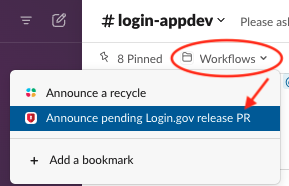
Use the /Announce pending Login.gov release PR workflow in #login-prod-changes to announce the start of the deployment
- Choose
PIV/CAC (identity-pki)for the application - Enter the the PR link
- The workflow will send a notification to the
#login-prod-changeschannel and cross-post to the#login-appdevand#login-deliverychannels for awareness.
Resolving merge conflicts
A full release after a patch release often results in merge conflicts. To resolve these automatically, we
create a git commit with an explicit merge strategy to “true-up” with the main branch (replace all changes on
stages/prod with whatever is on main)
cd identity-$REPO
git checkout stages/rc-2020-06-17 # CHANGE THIS DATE
git merge -s ours origin/stages/prod # custom merge strategy
git push -u origin HEAD
The last step may need a force push (add -f). Force-pushing to an RC branch is safe.
Staging
Staging used to be deployed by this process, but this was changed to deploy the main branch to the staging environment every day. See daily deploy schedule for more details.
Production
- Merge the production promotion pull request (NOT a squashed merge, just a normal merge)
- Use the
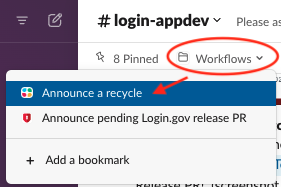
/Announce a recycleworkflow in#login-prod-changesto announce the start of the deployment- Enter the RC number that will be deployed
- The workflow will send a notification to the
#login-prod-changes,#login-appdevand#login-devopschannels
- In the
identity-devopsrepo:cd identity-devops - Ensure you have the latest code with a
git pull. - Check current server status, and confirm that there aren’t extra servers running. If there are, scale in old instances before deploying.
aws-vault exec prod-power -- ./bin/ls-servers -e prod aws-vault exec prod-power -- ./bin/asg-size prod pivcac - Recycle the PKI instances to get the new code. It automatically creates a new migration instance first.
aws-vault exec prod-power -- ./bin/asg-recycle prod pivcac-
Follow the progress of the PKI hosts spinning up
aws-vault exec prod-power -- ./bin/ls-servers -e prod -r pivcac # check the load balance pool health
-
-
PRODUCTION ONLY: This step is required in production
Production boxes need to be manually marked as safe to remove by scaling down the old instances (one more step that helps us prevent ourselves from accidentally taking production down). You must wait until after the original scale-down delay before running these commands (15 minutes after recycle).
aws-vault exec prod-power -- ./bin/scale-remove-old-instances prod pivcac -
Set a timer for one hour, then check NewRelic again for errors.
- If everything looks good, the deploy is complete.
Creating a Release (Production only)
- In the application repository, use your GPG key to tag the release.
git checkout stages/prod && git pull bin/tag-release - Add release notes in GitHub:
- Create a new release: https://github.com/18F/identity-pki/releases/new
- Release title:
RC #{NUMBER} - In the “Choose a tag” dropdown, enter the tag output by the
bin/tag-releasescript - Copy the release notes Markdown from the promotion pull request
- Click “Publish release”
Rolling Back
It’s safer to roll back PKI to a known good state than leave it up in a possibly bad one.
Some criteria for rolling back:
- Is the error visible for users?
- Is the error going to create bad data that could cause future errors?
- Is there a user-facing bug that could confuse users or produce a wrong result?
- Do you need more than 15 minutes to confirm how bad the error is?
If any of these are “yes”, roll back. See more criteria at https://outage.party/. Staging is a pretty good match for production, so you should be able to fix and verify the bug in staging, where it won’t affect end users.
Scaling Out
To quickly remove new servers and leave old servers up:
aws-vault exec prod-power -- ./bin/scale-remove-new-instances prod pivcac
Important:
As soon as possible, ensure that the deploy is rolled back by reverting the stages/prod branch in GitHub by following the steps to roll back below. This is important because new instances can start at any time to accommodate increased traffic, and in response to other recycle operations like configuration changes.
Steps to roll back
-
Make a pull request to the
stages/prodbranch, to revert it back to the last deploy.git checkout stages/prod git pull # make sure you're at the most recent SHA git checkout -b revert-rc-123 # replace with the RC number git revert -m 1 HEAD # assumes that the top commit on stages/prod is a merge -
Open a pull request against
stages/prod, get it approved, and merged. If urgent, get ahold of somebody with admin merge permissions who can override waiting for CI to finish -
Recycle the app to get the new code out there (follow the Production Deploy steps)
-
Schedule a retrospective
Retrospective
If you do end up rolling back a deploy, schedule a blameless retrospective afterwards. These help us think about new checks, guardrails, or monitoring to help ensure smoother deploys in the future.